Bulk Import Products
Learn how to use the Bulk Import feature to quickly import multiple products from any supported supplier as drafts, ready for review and listing.
What is Bulk Import?
The Bulk Import feature allows you to import multiple products from any supported supplier in one go. Simply paste a list of product URLs and SuperDS will automatically scrape each product's details through the extension, saving them as drafts in your dashboard for review before listing.
This is perfect for sellers who want to quickly build up their product catalog without manually uploading products one by one.
Bulk Import in Action
Watch the video below for a step-by-step guide on how to use the SuperDS Bulk Import feature. From pasting URLs to reviewing drafts, we'll walk you through the entire process so you can start importing products efficiently.
Prerequisites
Before using Bulk Import, make sure you have:
- The SuperDS Chrome Extension installed and active
- An active SuperDS account with a valid subscription
- The SuperDS dashboard open in your browser
The SuperDS extension must be installed and active in your browser for Bulk Import to work. Products are scraped through the extension in real-time.
How to Use Bulk Import
1. Open the Bulk Import Modal
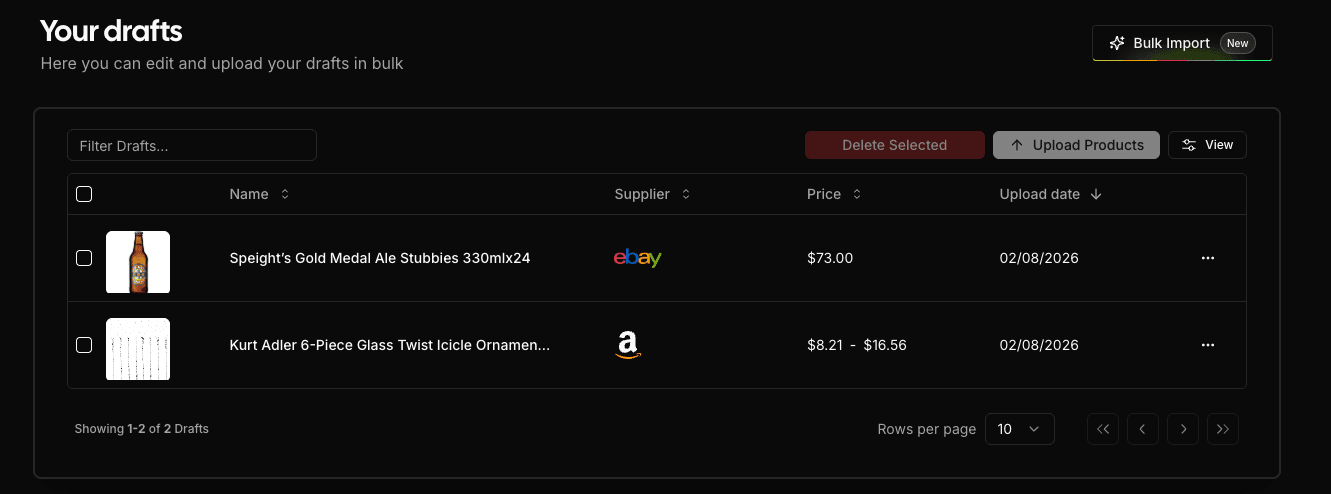
Navigate to the Drafts page in your SuperDS dashboard. You'll see the Bulk Import button in the top-right area of the page.
Click it to open the Bulk Import modal.
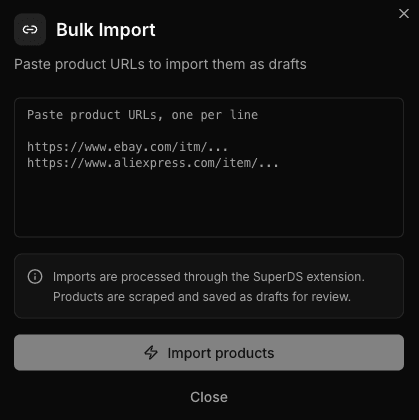
2. Paste Your Product URLs
In the modal, you'll see a text area where you can paste product URLs - one URL per line. You can paste URLs from any supported supplier, including:
- Amazon (US, UK, DE, FR, IT, AU, IN)
- AliExpress
- Alibaba
- eBay
- Etsy
- Temu
- Banggood
- CJDropshipping
- And more
3. Review Validation Results
As you type or paste URLs, SuperDS validates them in real-time. You'll see:
- Supported URLs - shown with a count of valid product URLs
- Unsupported URLs - highlighted so you can remove or replace them
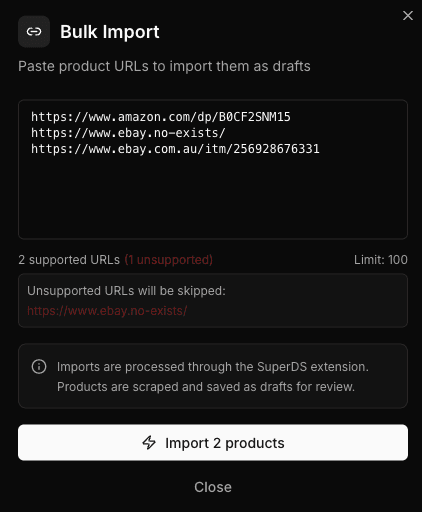
If any URLs are unsupported, they will be listed below the input area so you can review them. Unsupported URLs will be skipped during the import.
4. Start the Import
Once your URLs are validated, click the "Import" button to begin the import process.
5. Monitor Progress
After starting the import, the modal switches to a progress view where you can track the import in real-time:
- Current URL being processed
- Progress bar showing overall completion
- Imported / Failed counters updating live
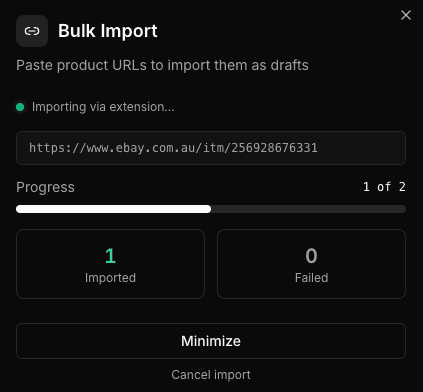
You can minimize the modal and continue browsing your dashboard while the import runs in the background.
Do not close your browser or disable the SuperDS extension while the import is running. The extension needs to remain active while the import is running.
6. View Results
When the import is complete, you'll see a results summary showing:
- Total products processed
- Imported successfully (with green indicators)
- Failed imports (with red indicators and error messages)
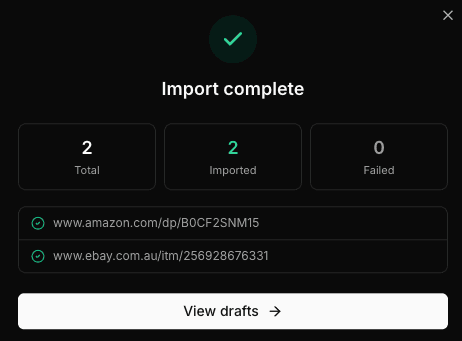
From here, you can:
- Retry failed imports if any products failed to import
- View drafts to see your newly imported products
7. Review and Edit Drafts
All imported products are saved as drafts in your Drafts page. You can review each product, edit details like title, price, and description, select images, and then list them to your store when ready.
Tips for Best Results
- Batch your imports - Import products in batches of 20-50 for the most reliable results.
- Use direct product URLs - Make sure each URL points directly to a product page, not a search results or category page.
- Check your plan limits - Your subscription plan determines how many products you can import at once. The limit is displayed in the modal.
- Keep the extension active - The import relies on the SuperDS extension to scrape product data. Make sure it's enabled and not paused.
- Review before listing - Imported products are saved as drafts so you can review and customize them before publishing to your store.
Get Started
Ready to scale your product catalog? Head to the Drafts page in your dashboard and click Bulk Import to get started.
With SuperDS's Bulk Import, building a large product catalog is faster and easier than ever. Import, review, and list - all from one dashboard.
Ready to Scale Your Dropshipping Business?
Join thousands of successful dropshippers using SuperDS to automate their business. List products from 20+ suppliers with one click.