Pricing Strategy
Set price tiers, multipliers and minimum prices in SuperDS so every product you import is priced automatically, and preview your list price and profit before you save.
How to Use Pricing Strategy in SuperDS
Your Pricing Strategy decides what you sell each product for. When you import a product with the SuperDS extension, every variation is priced from its supplier price using the tiers you set here. The Price & Stock Monitor uses the same tiers when it suggests a new price after a supplier price change.
Each store has its own pricing strategy, so an eBay store and a Shopify store can be priced differently.
The Default Strategy
Every new store starts with one tier: any price × 1.5, no minimum price, shipping added before multiplying, and rounding off. A product that costs $10 lists at $15, which is a 50% markup. Change it before your first import if that isn't the margin you want.
Open the Pricing Strategy Page
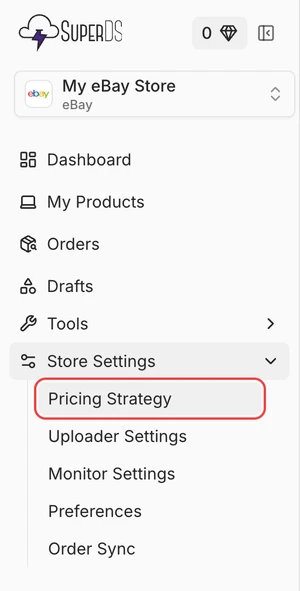
In the dashboard sidebar, open Store Settings and click Pricing Strategy. Make sure the right store is selected at the top of the sidebar.
Set Your Price Tiers
A tier covers a range of supplier prices. Your price is the supplier price multiplied by that tier's multiplier.
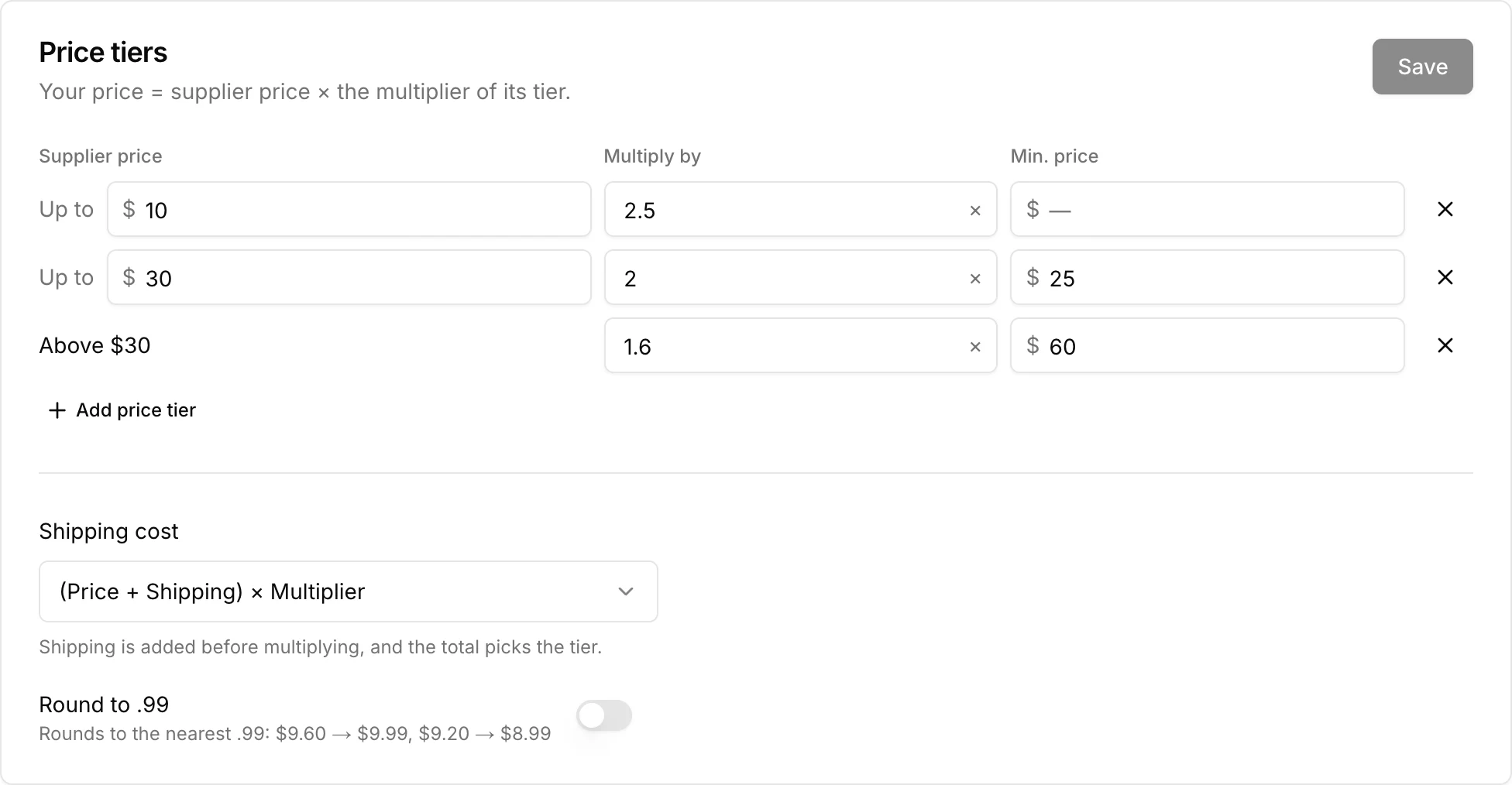
Each row has three settings:
- Supplier price (Up to): The highest supplier price in this tier. The first tier starts at $0 and each tier starts where the one above ends. The last tier has no limit and covers everything above it.
- Multiply by: The multiplier for this tier. 2 doubles the price, 1.3 adds 30%. It must be at least 1. If you want a 30% markup, enter 1.3, not 30.
- Min. price: Optional. If the multiplied price comes out lower than this, the minimum price is used instead.
Click Add price tier to split the top tier in two, and the × at the end of a row to remove a tier. Changes are not applied until you click Save. The page asks before closing or reloading if you have unsaved changes.
Shipping Cost
Choose how the supplier's shipping cost is handled:
- (Price + Shipping) × Multiplier: Shipping is added to the product price first, the total picks the tier, and the multiplier applies to both. Example: ($10 + $5 shipping) × 2 = $30.
- (Price × Multiplier) + Shipping: Only the product price picks the tier and gets multiplied. Shipping is then added at cost. Example: ($10 × 2) + $5 shipping = $25. Here the minimum price applies to the product price, before shipping is added.
Round to .99
Turn on Round to .99 to end prices in .99. Prices are rounded to the nearest whole amount minus one cent, so $9.60 becomes $9.99 and $9.20 becomes $8.99.
Preview Your Prices
The Preview section shows what you would list a product at before you save. Enter a supplier price and shipping cost to see the list price and your profit before marketplace fees, or click anywhere on the chart.
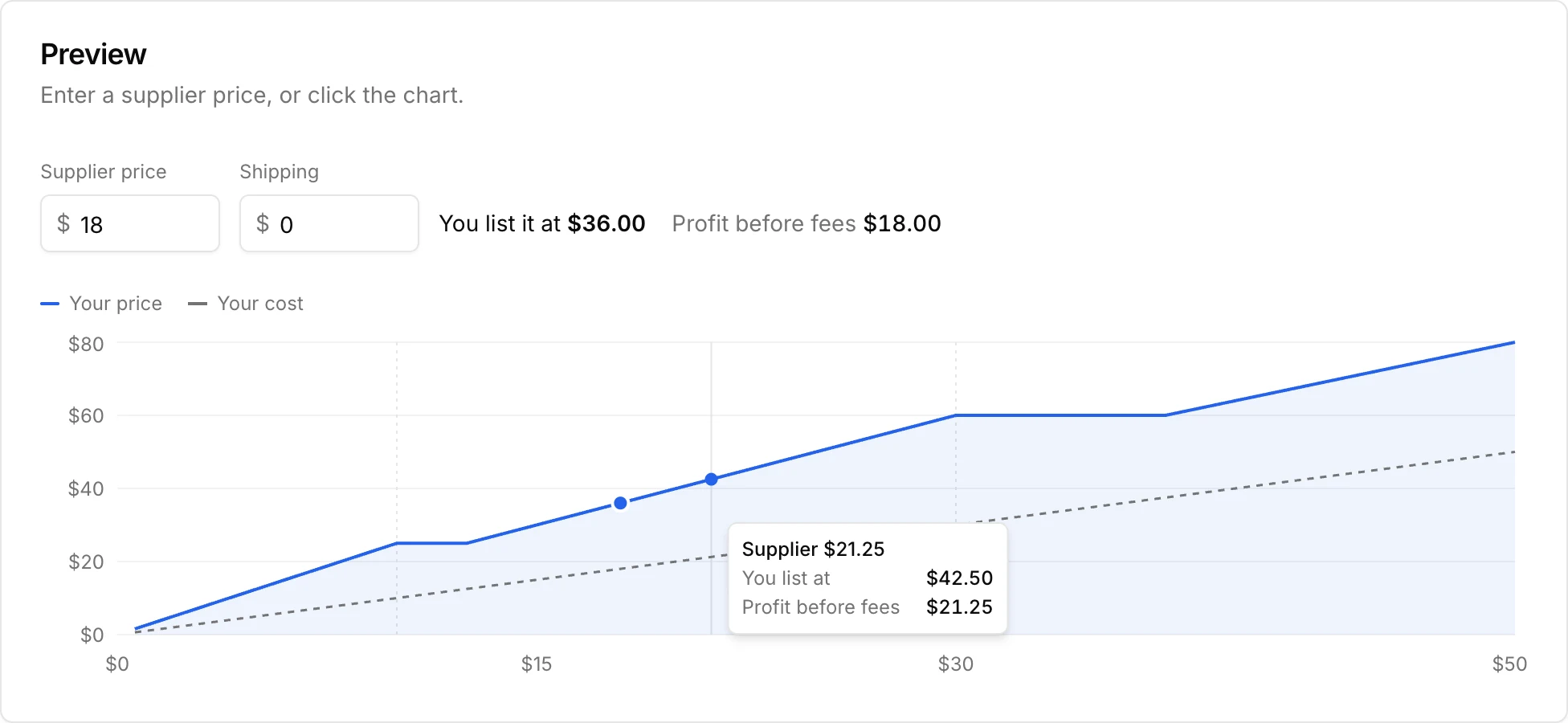
The blue line is your price and the dashed line is your cost. The space between them is your profit. The faint vertical lines mark where one tier ends and the next begins.
Watch the Tier Edges
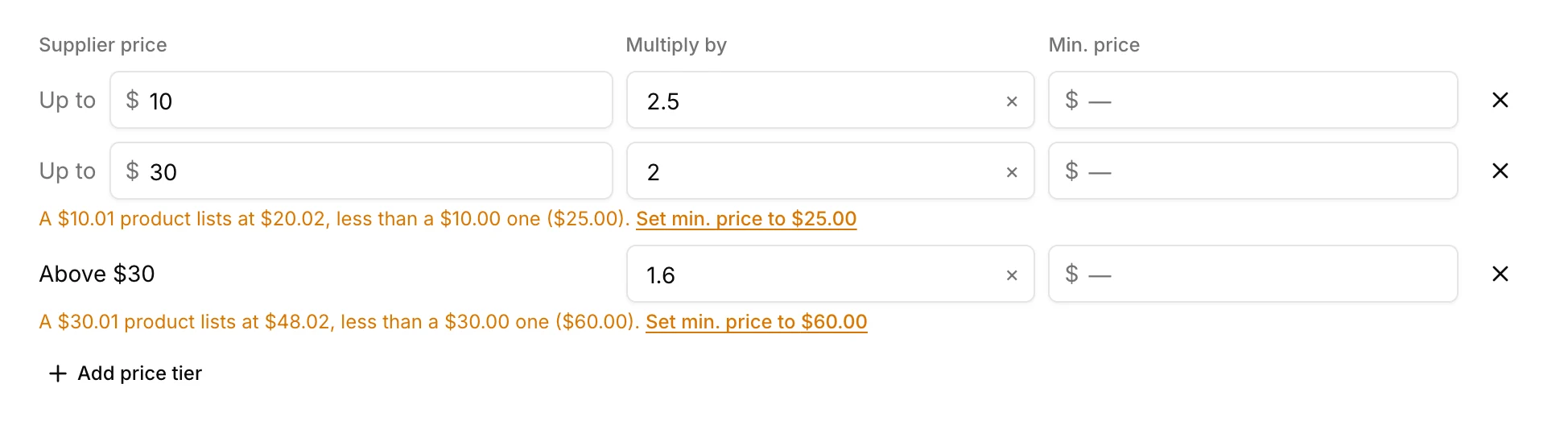
When a higher tier has a lower multiplier, a product that costs slightly more can list for less. With a $10 tier at × 2.5 and the next tier at × 2, a $10.00 product lists at $25.00 but a $10.01 product lists at $20.02.
SuperDS shows a warning under the tier when this happens. Click Set min. price in the warning to set that tier's minimum price to the price at the edge, so prices never drop as the supplier price goes up.
Example Pricing Strategy
This is the strategy in the screenshots above:
| Supplier price | Multiply by | Min. price |
|---|---|---|
| Up to $10 | 2.5 | None |
| Up to $30 | 2 | $25 |
| Above $30 | 1.6 | $60 |
With shipping set to $0:
- A $8 product lists at $20 ($8 × 2.5).
- A $12 product lists at $25. $12 × 2 is $24, which is below the $25 minimum.
- A $18 product lists at $36 ($18 × 2).
- A $32 product lists at $60. $32 × 1.6 is $51.20, which is below the $60 minimum.
- A $40 product lists at $64 ($40 × 1.6).
Cheap products get the highest markup, where a few dollars of profit matter most. The minimum prices keep a product from listing for less than a cheaper one in the tier below.
Get Started with Pricing Strategy
Set your tiers once and every product you import is priced the same way, without editing each listing by hand. Check the preview for a few typical supplier prices, keep an eye out for tier-edge warnings, and click Save.
Ready to Scale Your Dropshipping Business?
Join thousands of successful dropshippers using SuperDS to automate their business. List products from 20+ suppliers with one click.